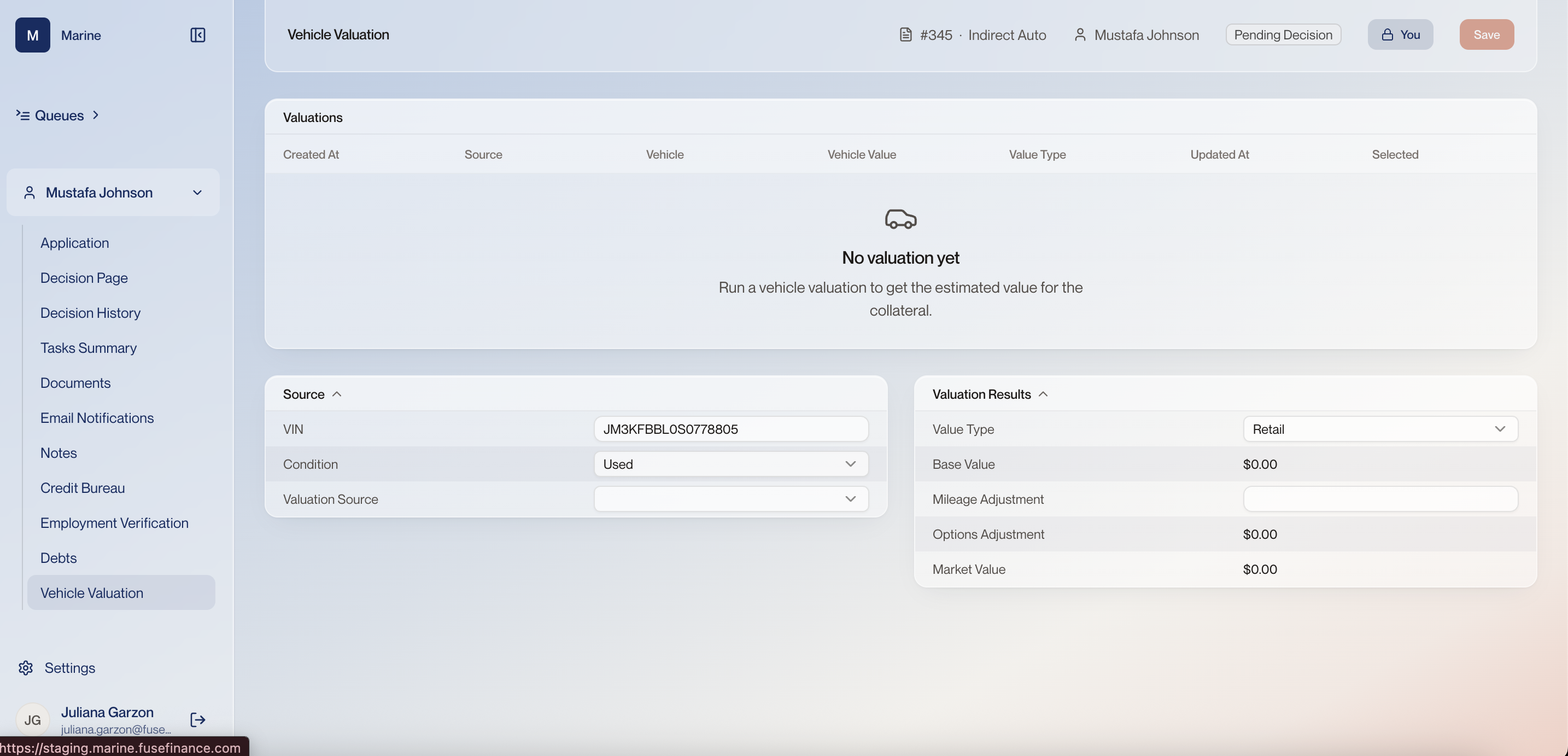
Reference · Reference: Vehicle Valuation Reference: Vehicle Valuation Where the collateral figure the ratios are read against comes from. Come here when the value looks wrong and you need to run another valuation from the VIN. Two providers can disagree on the same car, and the source beside the value is what answers where the number came from if the deal is questioned later.
Vehicle Valuation 1 Vehicle Valuation The same per-application nav as the Decision page, with Vehicle Valuation selected. You have not left application #345. 2 Valuations table The list of every valuation held against this vehicle: when it ran, which source it came from, the value it returned, and which one is marked Selected. On an indirect application the first row usually arrives with the deal from DealerTrack; further rows appear when someone runs a valuation from the VIN. Selected is the value the deal is judged against. Running a second valuation adds a row — it does not replace the first, so the row you want has to be selected deliberately. 3 Where valuations appear A row lands here for each valuation on the vehicle. Until one arrives from the dealer or is run from the VIN, the collateral on the application has no value attached to it. Before you decide, check there is a selected valuation. Without one the deal carries no collateral value for the ratios on the Decision page to be read against. 4 Source The inputs a valuation runs from: the VIN, the condition of the vehicle, and which valuation provider to ask. 5 VIN The vehicle identification number carried over from the application. It is what the provider looks the vehicle up by, and it is what a fresh valuation is run from. A wrong digit values a different car. Check it against the dealer's paperwork before running anything. 6 Condition New or used. It is one of the inputs a valuation is run from, so it changes the figure that comes back. 7 Valuation Source Which provider the value came from. On an indirect application — which at Marine means all of them — the appraisal arrives with the deal from DealerTrack, carrying the source, the value, the valuation type and the date it was done. You can also run a valuation yourself, from the VIN, to get today's value. Two providers can disagree on the same car, and the source sits on the record with the value. If you are asked to defend the number later, this is the field that answers where it came from. 8 Valuation Results What the provider returned for this vehicle: the value type, a base value, the adjustments applied to it, and the market value they add up to. Running a valuation from the VIN also returns the vehicle's specifications, and which of those you select changes the total value. The VIN alone does not settle the number. Trim, equipment and mileage move it, so the market value is the result of choices made here rather than a fact returned whole. 9 Value Type Which published value the valuation uses — retail, trade-in or wholesale, depending on what the provider returns. The type chosen decides which published figure the deal is measured against, so it is a lending policy decision rather than a preference. Use the type your policy calls for; ask your Fuse contact if it is not settled. 10 Base Value The provider's starting value for this vehicle before any adjustment for mileage or equipment. 11 Mileage Adjustment What the vehicle's mileage takes off or adds to the base value. It is an editable field, so it can be corrected when the odometer reading on the paperwork differs from what the provider assumed. 12 Options Adjustment What the vehicle's optional equipment is worth, added to the base value. Selecting a different specification changes it. 13 Market Value Base value plus the adjustments — the collateral value the deal uses. This is the figure the amount financed is compared against, and the one that drives LTV. It is the number worth carrying back to the Decision page.