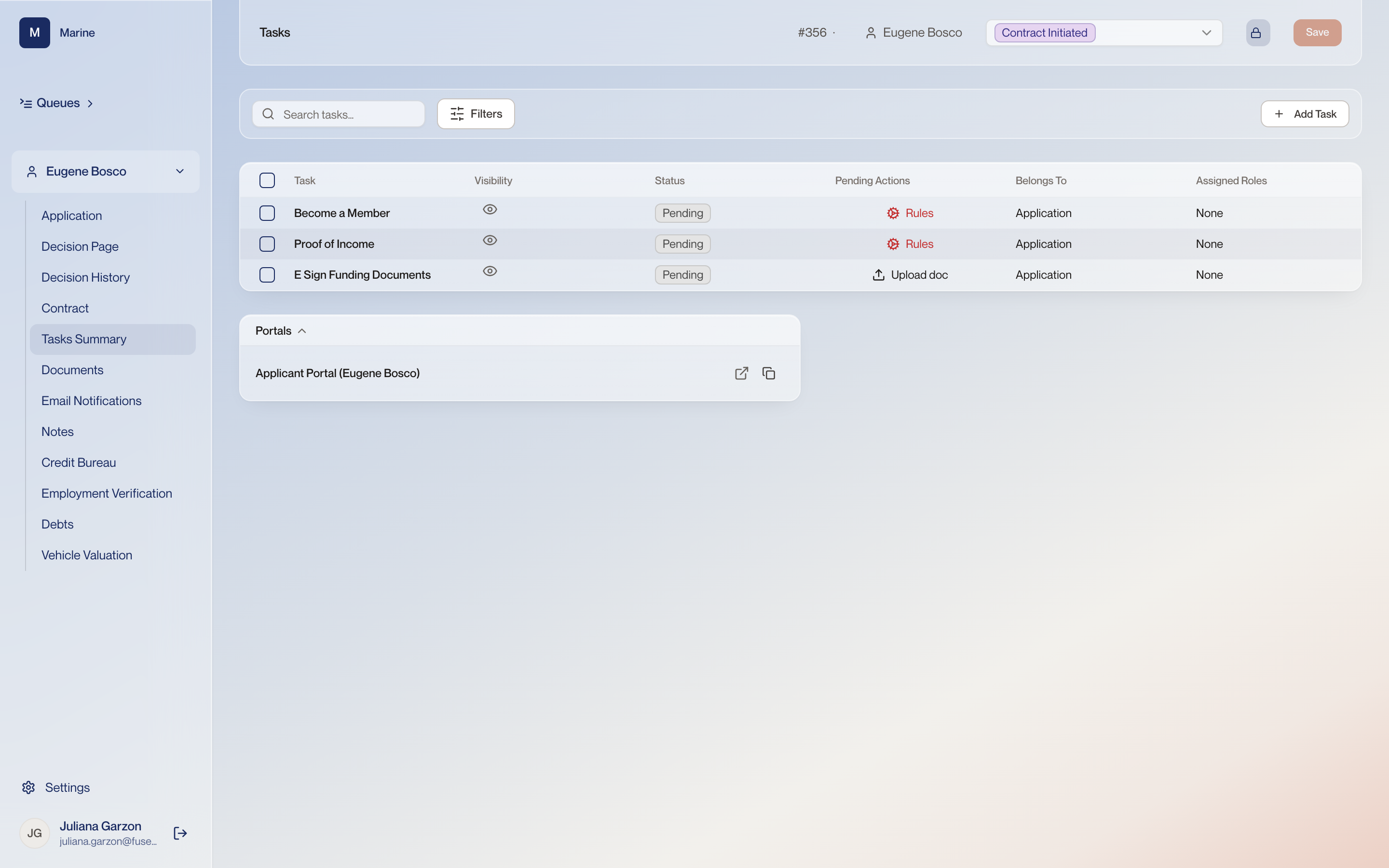
Reference · Reference: Tasks Summary Reference: Tasks Summary The stipulations that stand between a contract and funding: status, last update, notes and the rules behind each one. The list is the subset that applies to this deal, not a standing checklist — a flow reads the file at Contract Initiated and attaches only the stipulations it calls for. A stipulation is a single requirement attached to one application — a document to collect, a condition to satisfy — and each one belongs to the applicant, an employee or the funder. The exact wording of the on-screen message when PTI blocks funding has not been confirmed, so do not go looking for a particular sentence. If the booking fails, a banner appears with a Retry or Reconcile control — use it rather than starting again, so the loan is not booked twice.
Tasks Summary 1 The task list Tasks are the stipulations on the file — the things the applicant, an employee or the funder has to do before it can fund. On this file: Become a Member, Proof of Income, E Sign Funding Documents. Every task has the same structure: what is being asked, its status, when it was last updated, its notes, any rules attached to it, and its documents. Nobody assembles this list by hand, and no file carries every stipulation Marine has. When an application moves to Contract Initiated a flow reads the deal and attaches only the stipulations that apply to it, so a “become a member” task appears for someone who is not already a member and is absent for someone who is. Read a task list as this deal’s conditions, never as a universal checklist. Watch out: The RIC — the Retail Installment Contract — behaves unlike the rest: it stays locked until every other stipulation on the file is finished or waived, and the contract's real figures are typed on a separate Contract page rather than on the stipulation itself. 2 Visibility Whether the applicant sees this stipulation in their portal, or only your team does. Marine begins with Indirect Auto, so in practice a task is cleared by the dealer, the funder or your own staff rather than by an applicant working a portal. Read this column as who is expected to clear it. 3 Status Where each task stands. All three here read Pending. Funding waits on this column. Every task has to clear before money moves. 4 Pending Actions What has to happen next for each task, as a link you can act on: Rules on the first two, Upload doc on the third. This column is the work itself, not a description of it. A Rules link means the task clears when conditions are met; Upload doc means somebody has to attach a file. 5 Belongs To What the task hangs off. All three here read Application, so they belong to the file rather than to a single person on it. A task can sit with the applicant, with an employee or with the funder. This column is where you read which, so you know whose court the file is in. 6 Assigned Roles Which role has been put on the task. All three read None on this file. None does not mean nobody has to do it. It means no role has been named, so the task is worked by whoever picks the file up. 7 Contract Initiated The status in the header. Tasks are evaluated when an application reaches Contract Initiated, and this list is the result of that run. Which tasks open depends on facts about this deal, so the list is this file’s conditions and never a standing checklist. 8 Add Task Adds a task by hand, on top of the ones the run opened. Some stipulations exist only as options somebody adds here — nothing about a deal ever opens them. A task added by hand holds funding exactly like an automatic one. 9 Two kinds of stipulation Some stipulations the system opens by itself when a fact about the deal calls for it. Others exist only as options an underwriter adds by hand. A stipulation missing from a file means one of two very different things — it genuinely does not apply, or nobody added it. Which kind it is tells you which.