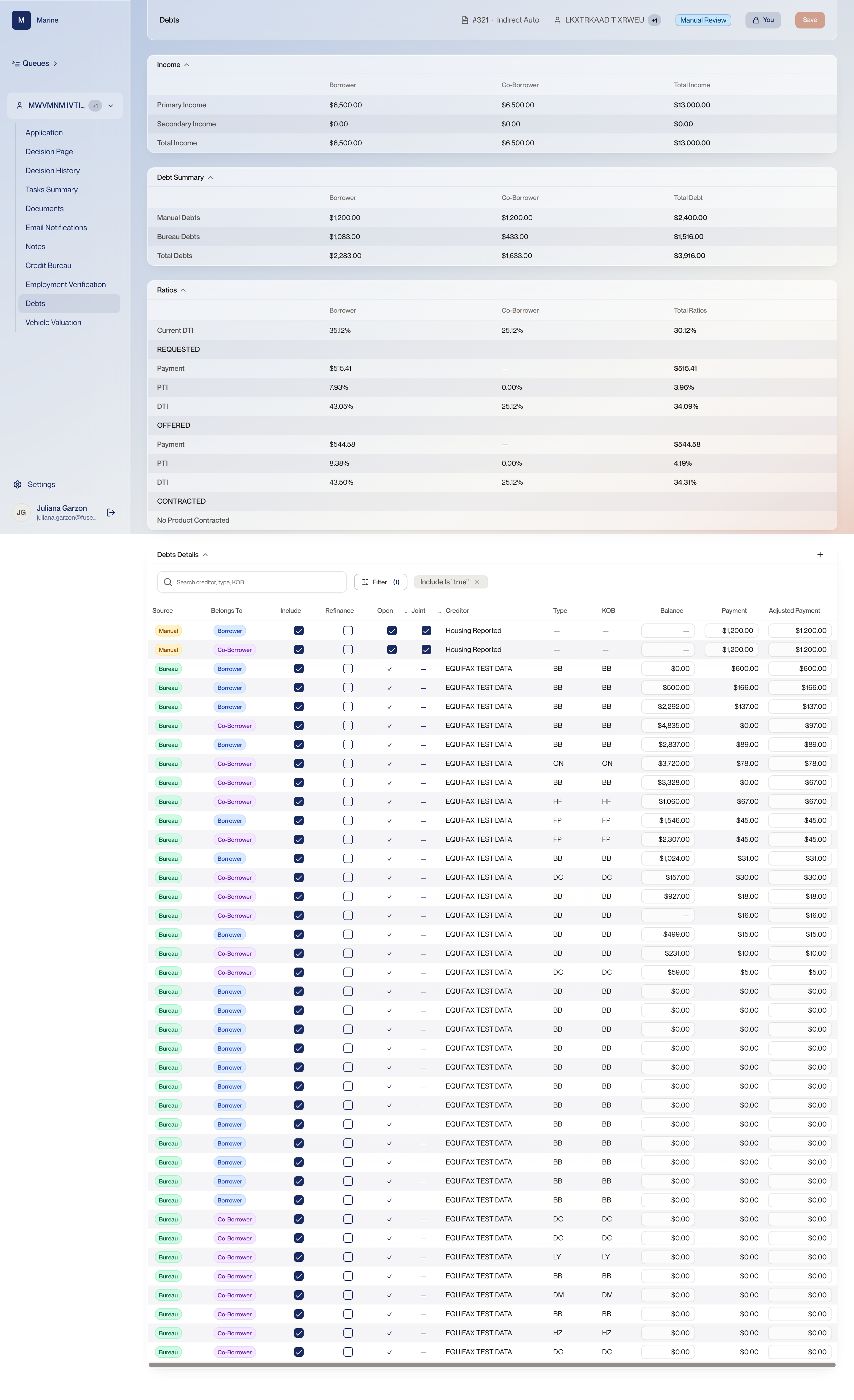
Reference · Reference: Debts Reference: Debts Every debt the file is carrying, where each one came from, and the ratios read off them. Come here to look up a single column or an adjustment without walking the flow. How much DTI is tolerated is configured per client rather than fixed, so the same ratio can pass at one lender and fail at another. The table arrives filtered to the debts counting towards the ratios: otherwise a debt that was excluded reads as a debt that was never reported. An adjusted payment moves the number for the whole application.
Debts 1 Income Primary and secondary income for the borrower and the co-borrower, with a total for each column and a combined total on the right. Every ratio below this card is that total income divided into something. Read it first, because a wrong income makes every ratio underneath it wrong too. 2 Debt Summary The debts below rolled up three ways: manual debts, bureau debts, and the total — again per person and combined. The manual line is what the applicant said they pay; the bureau line is what was reported about them. Seeing the two apart tells you how much of this file rests on the applicant's own account. 3 Current DTI DTI is debts divided by income: how much of what a person earns each month goes to paying debt. Current DTI is that ratio before this loan is added. How much of that ratio is tolerated is not a fixed number — it comes from the rules configured for the client. The same DTI can pass at one lender and fail at another. 4 Requested Payment, PTI and DTI on the terms that were asked for. The page carries several versions of DTI, with PTI alongside them. Requested is the applicant's ask. If the ratios fail here and pass under Offered, the deal only works because it was restructured. 5 Offered The same three figures on the terms Marine is actually putting in front of the applicant. This is the block your decision is judged against. Requested and Contracted sit either side of it, and they are not the same numbers. Watch out: Current, Requested, Offered and Contracted are four separate blocks. Check which one you are reading before you quote a ratio. 6 Contracted The terms the applicant has signed for. It fills in once a product is contracted; before that the deal is still an offer and it reads No Product Contracted. It tells you whether you are looking at something proposed or something committed. Only a contracted deal has terms the borrower is bound to. 7 Search the debts Search the table by creditor, type or KOB. A thick file runs to fifty rows. Finding one creditor by eye is how a row gets missed. 8 Filter, and the filter already on The Filter control, with the filters currently applied shown as chips beside it. This table opens filtered to Include is “true”. The default view hides excluded debts. If a debt you expect is missing, clear the chip before you conclude it was never reported. Watch out: Filter (1) means one filter is on. It is easy to read a filtered table as the whole table. 9 Source Where the debt came from. Bureau debts arrive with the credit pull. Manual ones are what the applicant typed into the Journey — rent, a housing payment. A manual debt is the applicant's own account of what they pay. It is on the file because they said so, not because a bureau reported it. 10 Belongs To The tab pulls in the debts of both people on the application. At Marine the two parties are the borrower and the co-borrower, and each row says which of them the debt belongs to. Two people means two sets of obligations against one income figure. Reading the list without reading this column understates one of them. 11 Include Whether this debt counts towards the ratios, or sits on the file and is ignored. Including or excluding a debt changes DTI and PTI as surely as changing its payment does. 12 Refinance Marks a debt as one this loan would pay off. On this application no debt is ticked. Ticking the box marks the debt as one this loan would refinance, and it bears on the ratios the deal is judged on. Watch out: Confirm with your Fuse contact exactly how a ticked debt is treated in the ratio arithmetic before you use this column in a live file. 13 Open and Joint Open says the debt is still active rather than settled and closed. Joint marks an obligation shared by the borrower and the co-borrower rather than owed by one of them alone. A closed debt is history; an open one is money going out every month. Joint is what tells you a payment already counted against one party is the same obligation you are looking at against the other. 14 Creditor Who the debt is owed to. The manual rows read “Housing Reported” rather than a lender name. The creditor is how you match a row on this table to a line on the bureau report when the two disagree. 15 Balance, payment, adjusted payment Each debt carries a balance, a payment, and an adjusted payment. The adjusted payment is the one you can change. DTI and PTI are recalculated from these figures, and applications are approved or declined on those ratios. This field is where an underwriter changes the arithmetic the decision rests on. Watch out: Adjusting a payment moves the ratios for the whole application. Do it because the real obligation is different, and say why in Notes. 16 PTI Payment to income: the signed monthly payment — the base payment plus any warranty and any GAP — divided by the applicant's monthly gross income. PTI above 20% cannot fund, and alone among the conditions on a file it cannot be waived. It is the one hard gate in the system. Watch out: The exact wording the screen shows when PTI blocks funding has not been confirmed. Try it in the sandbox rather than expecting a particular message.